

MaiTai Codes
Automating jet code reservations to simplify data management and support mission planning.

Kessel Run
1 Product Manager
4 Developer Pairs
2 Designers
My Role: Lead Product Designer
Enterprise UX · Complex Workflow Design · Data Management · Systems Thinking · Rules-Based Design · Interaction Design · Prototyping · User Research · Usability Testing · Automation · Design–Development Collaboration

Feature in Action
What:
Military aircraft use four-digit verification codes to help identify whether a jet is friendly or potentially hostile. The practice dates back to World War II and remains an important part of how aircraft are identified in the air.
Who:
Data Managers reserve these codes for individual military Locations. Mission Planners at those Locations then assign the reserved codes to specific jets before they take flight.
Why:
When a jet enters controlled airspace, Air Traffic Controllers can read its four-digit code through the aircraft's transponder. A recognized code indicates a friendly aircraft; an unknown code can trigger further investigation to determine whether the aircraft poses a threat.
Data Managers were wasting valuable time manually calculating, guessing, and cross-referencing which reservation codes were available to assign to jets. Managing these numbers across multiple aircraft Unit Locations made a straightforward task unnecessarily complex and prone to error.
We automated the assignment of available code reservation blocks, removing the guesswork for Data Managers while giving them the flexibility to shape reservations around their needs.
Big takeaway: By automating the work of finding and reserving available codes, we made a complex, error-prone task faster and easier to manage at scale.
1-5 minutes per Location Saved
Users estimated that the new workflow saved 1–5 minutes per Location. Across hundreds of Locations in a given week or month, those small savings could add up significantly over time.
Less Room for Error
The system handled the calculations and availability checks that previously fell on Data Managers, reducing the opportunity for mistakes in a process where accuracy mattered.
Focus Shifted Elsewhere
Code Reservations were only one part of a Data Manager’s day-to-day work. By taking the repetitive work off their plate, we gave them more time to focus on the rest of their responsibilities.
Feature Evolution
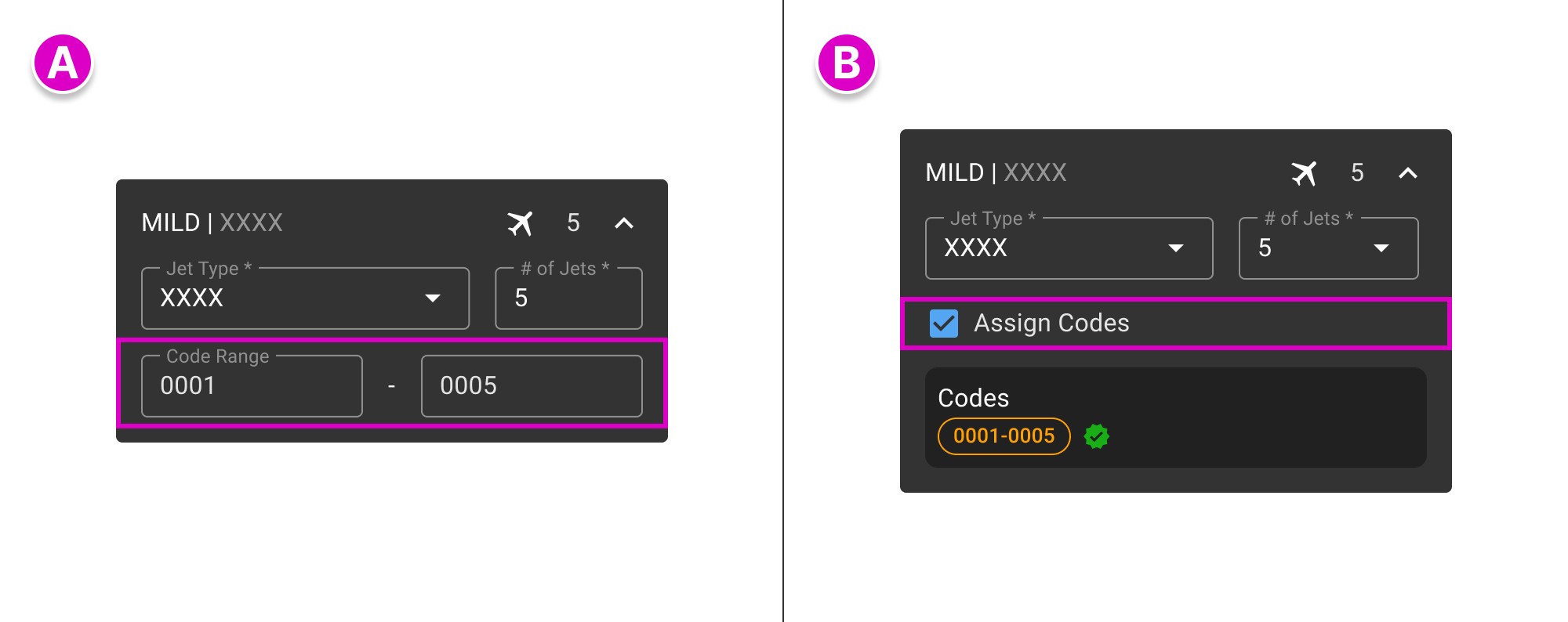

V1
Users had to manually input a reservation range.
Inherited designV2
Converted manual entry into a one-click reservation generator.
V3
Enabled generated reservations to be edited.
V4
Enabled multi-block, non-contiguous reservations within a single Location.
Research
V1 - Manual

Original flow inherited from the existing product


Upon joining the team, MaiTai had a tool that allowed Data Managers to reserve a batch of uninterrupted codes (think 1, 2, 3, etc.) for the Locations they oversaw. But the feature was deeply nested, provided minimal context, and offered no instruction or guidance.

BLANK SLATE
Users had to manually input a range of codes.NO FEEDBACK
Users had no indication whether their requested block of codes was available until they submitted it.

UNKNOWN STATE
Users had to click Save to find out if the range was available.ERROR STATE
Unavailable ranges prompted an error with no suggestions.
After interviewing users, we heard consistent frustration with how much of the work was placed on them to:
Identify and manually enter two numbers just to create a reservation range
Determine how many codes the range actually contained, since certain digits could be omitted
Guess which codes or ranges were available, since availability wasn't validated until they clicked Save
“I don’t like inputting codes where it feels like I’m shooting blind.”
“You almost always know what block size to assign.”
“There can be many jets assigned to a Location... This could mean substantially large amounts of math to do.”
We asked: What do you think of the idea of system-generated Codes?
Their reaction: big smile
The process was not only manual, but a shot in the dark. What if we could use the information we already had to logically generate and verify available code assignments, instead of putting the onus on the user?
Design
V2- Automate

V2 - Auto-generate a reservation block
1
Data Managers needed a block of codes equal to or greater than the number of jets at a given Location, ensuring every jet could be assigned a unique code when needed.
2
Users didn't want to manually count jets, calculate reservation ranges, or determine which codes might be available.
3
Most Data Managers didn't care which codes were reserved, as long as in-air jets were never assigned the same code at the same time.
4
Reservation ranges needed to contain consecutive codes with no skips.*
*This requirement later changed when we brought new users into the process.

Codes were automatically generated, verified, and added to a Reservation with one click.
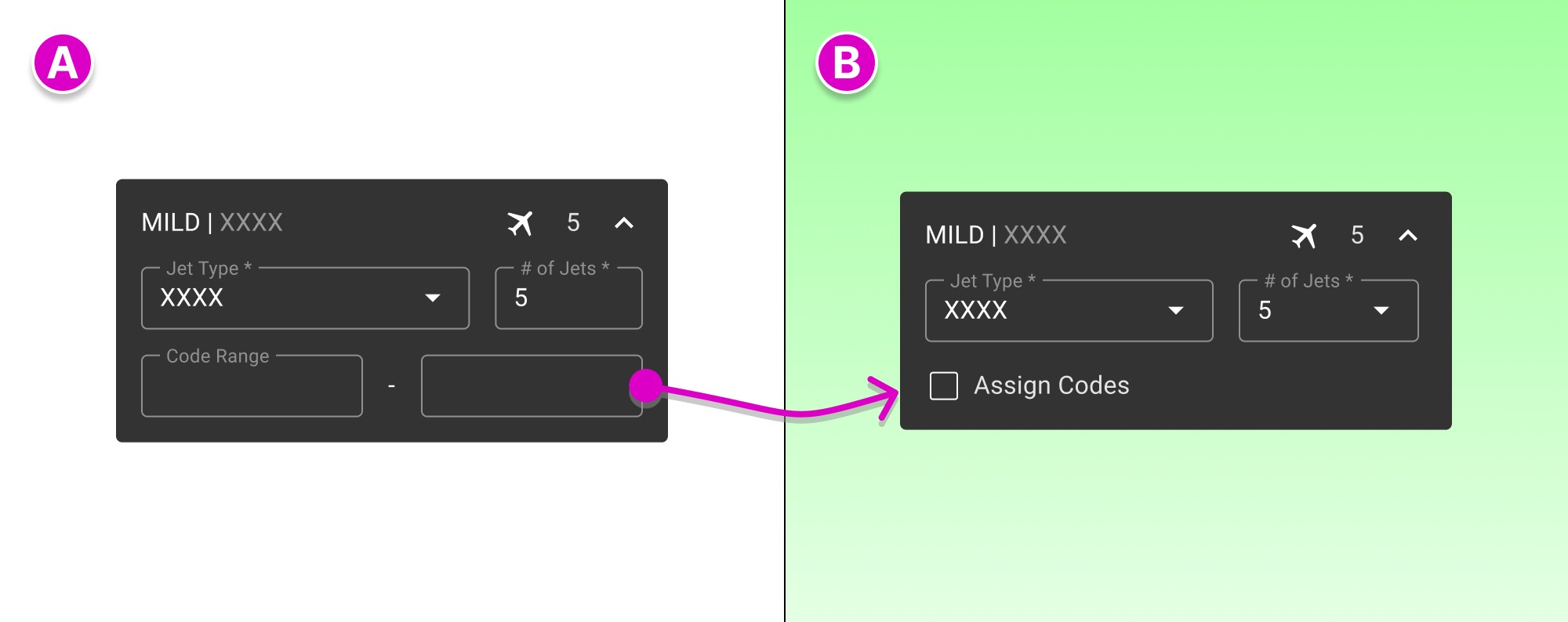
V1 (BEFORE)
Tell the system what codes you want.V2 (AFTER)
Tell the system to figure it out.

ASSIGN
User selects Assign Codes to initiate a Reservation.GET CODES
The system automatically generates and verifies enough codes to cover the assigned jets.
Positives: Users appreciated the one-click solution and found it easy to use. They liked that it removed the need for manual input.
Negatives: The design was too restrictive. Users still wanted the ability to adjust their Reservations as needed.
V3 - Configure

V3 - Users could configure the generated Reservation

Users could change the Range Size and Starting # after a Reservation was assigned.
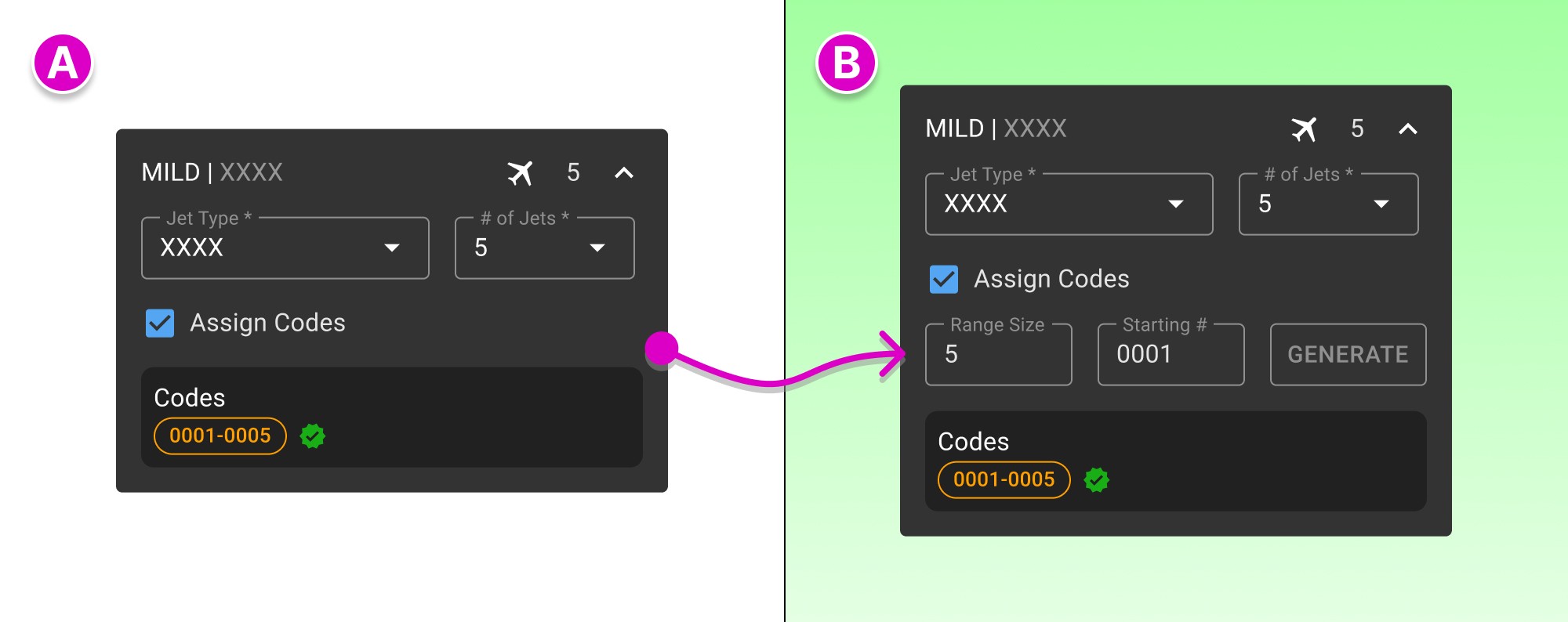
V2 (BEFORE)
Tell the system to figure it out.V3 (AFTER)
Tell the system how you want it.

ADJUST RANGE
Range sizes could be configured to user’s needsGENERATE
A new verified code block would be assigned

ADJUST START
Users could adjust the Starting # based on code availability.GENERATE
The system generated and verified a new code block closest to that #.
Positives: Users appreciated how we combined automation and configuration, saying the design covered most of their needs (80%).
Negatives: The design didn’t account for a variety of edge cases. This became our final big challenge.
“I like it. Its good. Because as long as I can edit the Range size, it’s perfect. It does its job perfectly.
“If I could add another range block that would be the easy button for that. Sometimes I have ranges that work around ranges.”
“I do like Range Size. It’s actually really nice. It autogenerates which is perfectly acceptable, because whoevever is getting those Codes is going to take into account how many jets they have anyways. So the system is just doing it for them…"
“If I can’t customize with that, it gets a little annoying. Multiple additions would be good.”
Why this still needed some work:
Users could only create one Reservation block per Location. Some users wanted the flexibility to add additional blocks.
Some users needed to reserve specific codes alongside a continuous block. For example, leadership might require a one-off code like 0221, which our design couldn’t accommodate.
A single contiguous block wasn’t always available. Users sometimes needed to work around existing Reservations by coordinating with other Locations, creating additional logistical work.
There was no universal model for how users determined which codes to reserve, and their needs varied by Location. Rather than impose a single approach, we wanted to give users the flexibility to create Reservations that worked for them.
V4 - Empower
V4 - Creating flexible Reservations

V4 - Adding multiple Reservation blocks

Users could assign multiple contiguous code blocks to one Location while still configuring Range Size and Starting # as needed.

Users could edit the individual codes within a block, allowing them to create non-contiguous Reservations as needed.

V3 (BEFORE)
Tell the system to create one contiguous block.V4 (AFTER)
Tell the system what your Reservation needs.

ADD BLOCKS
More than one code block could be added.VERIFY & DISPLAY
The system verified and displayed the additional block.
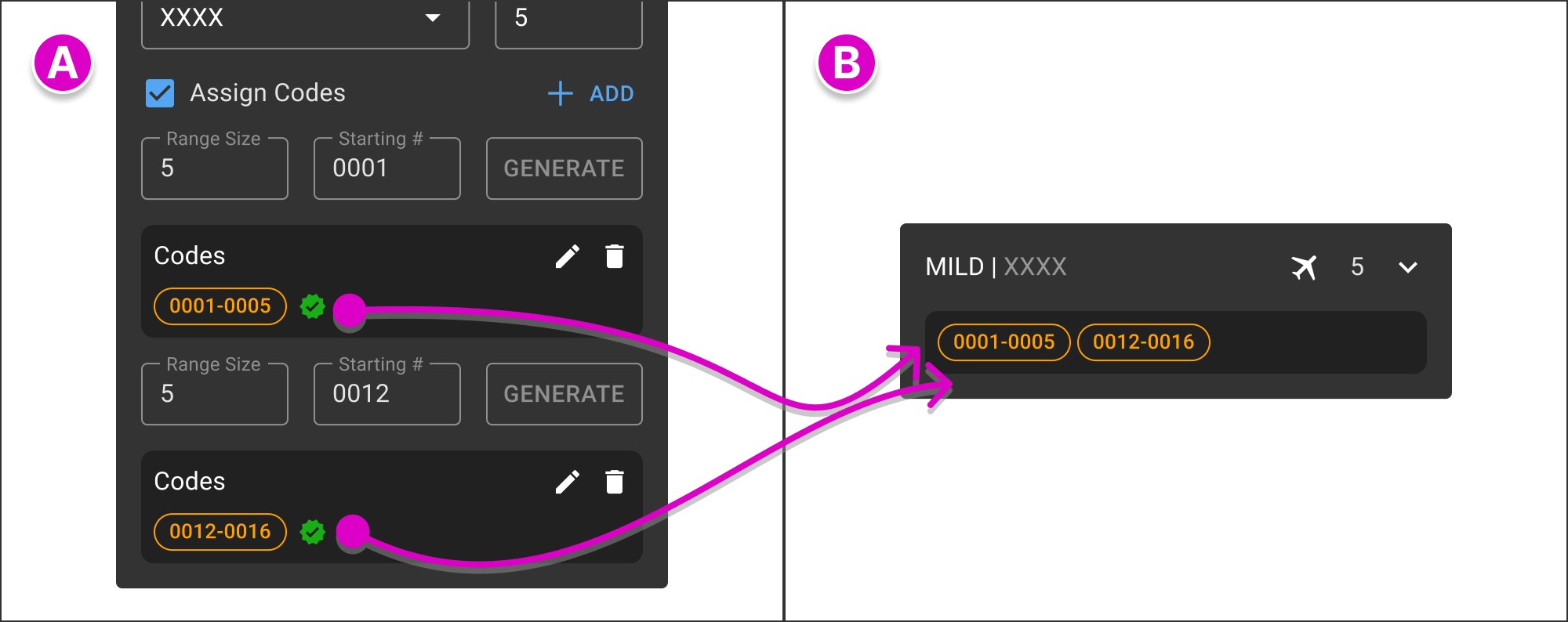
ADD MULTIPLE BLOCKS
Users could add multiple Reservation blocks.SAVE AS ONE
The system consolidated them into one readable grouping.

CREATE COMPLEX COMBINATIONS
Users could create complex combinations of code blocks.CONSOLIDATE ON SAVE
The system organized them into a single, readable grouping.
We conducted A/B Testing:
Our latest iteration allowed users to add additional Reservation blocks to a Location and edit individual codes within a block, removing the requirement for every Reservation to be contiguous.
We tested two similar designs:
A nested side panel within the existing panel, and a new expanded popup.
Users preferred the nested side panel.
Positives:
Preserved context and flexibility. Users could keep the Reservation workflow open while referencing other information on the page, including available codes.
Validated the interaction model. After stress-testing the logic against numerous edge cases, users found the new functionality intuitive and easy to use while still meeting their needs.
Built on an established foundation. The final design extended patterns users already understood and liked, making the functionality easier to implement and learn.
“This is pretty readily intuitable and usable. We’d start using this feature as soon as it was there. Immediately.”
“The ability to reach in and modify the assignments down to the individual code is very valuable. Saves you on the data management and troubleshooting side of things.”
Next Up
Nova Case Study
Launching a New Landing