

Web Enrollment

IDEMIA
Enterprise UX · Configurable Workflow Design · Rules-Based Design · Interaction Design · Edge Case & Exception Handling · Accessibility · Prototyping · Design–Development Collaboration · User Testing · Cross-Functional Collaboration

IDEMIA's Web Enrollment promotional page, highlighting fingerprint capture.
Who:
Primary user: Customer Service Representatives (CSRs) working at DMV/RMV locations across the U.S. They operate IDEMIA's Web Enrollment system to process ID applications and renewals.
Secondary user: Individuals applying for or renewing their ID. While they don't directly use Web Enrollment, their information and biometric data are captured through the CSR's workflow.
What: CSRs are responsible for collecting the information required to process a new or renewed ID. This includes capturing a photo and signature, collecting documents, and, in some cases, capturing fingerprints.
Web Enrollment didn't support fingerprint capture, creating a gap in our product offering as IDEMIA competed for new state contracts.
We had the fingerprint capture hardware; we needed to design the experience that brought it into Web Enrollment.
We designed and built a configurable fingerprint capture workflow within Web Enrollment that could adapt to different capture requirements and applicant circumstances.

IDEMIA fingerprint capture device integrated with Web Enrollment
Requirements
As part of our Web Enrollment app, we needed to add configurable Fingerprint scan capabilities so CSRs could efficiently capture multiple types of fingerprints, while testing against Quality and Match Scores.
I was initially given a pretty vague set of requirements:
There had to be capabilities for capturing multiple fingerprints
A Quality and Match status needed to be displayed
A user needed the ability to recapture a fingerprint when it failed (ex: broken arm, loss of limb)
A user needed the ability to override when applicable
"The fingerprint capture is a key part of their process. We're validating that the people who show up to get their IDs, are who they say they are." - IDEMIA Sales rep
Understanding Fingerprints
What is a Fingerprint Quality Score?
The scanner evaluates how clearly a fingerprint's unique features—or minutiae—were captured. The better the capture quality, the higher the Quality Score and the more likely the print is to meet the required standards and produce a reliable match.
What is a Fingerprint Match Score?
A Match Score indicates how closely a newly captured fingerprint corresponds to an existing fingerprint record. A higher score indicates greater confidence that the fingerprints belong to the same person.

Example of the final 3-fingerprint capture workflow, including Quality and Match feedback
Impact
We turned a missing capability into a configurable part of Web Enrollment that could scale across different customers and capture requirements. The feature went on to support statewide deployments, strengthen the product offering, and contribute to millions in revenue.
When IDEMIA won or renewed a contract with a state that required fingerprint capture, this feature became part of the statewide Web Enrollment deployment—rolling out across every DMV/RMV location in that state.
The feature became a key part of the Web Enrollment product offering, highlighted on IDEMIA's website and used by the sales team in RFPs and product demonstrations.
The fingerprint capture capability helped strengthen the competitiveness of our RFP bids, contributing to long-term statewide contracts and millions of dollars in revenue for the company.
Research
One of the biggest limitations we faced was our inability to speak directly with the states we were competing for. Instead, I worked through our sales reps to gather secondhand information and clarify questions around the requirements in various RFPs.
Once I had an initial understanding of what we needed to deliver, I began sketching potential workflows and exploring different solutions. I iterated and tested these concepts with my team, internal staff, and sales reps, using their feedback to refine the experience and develop a competitive feature offering.
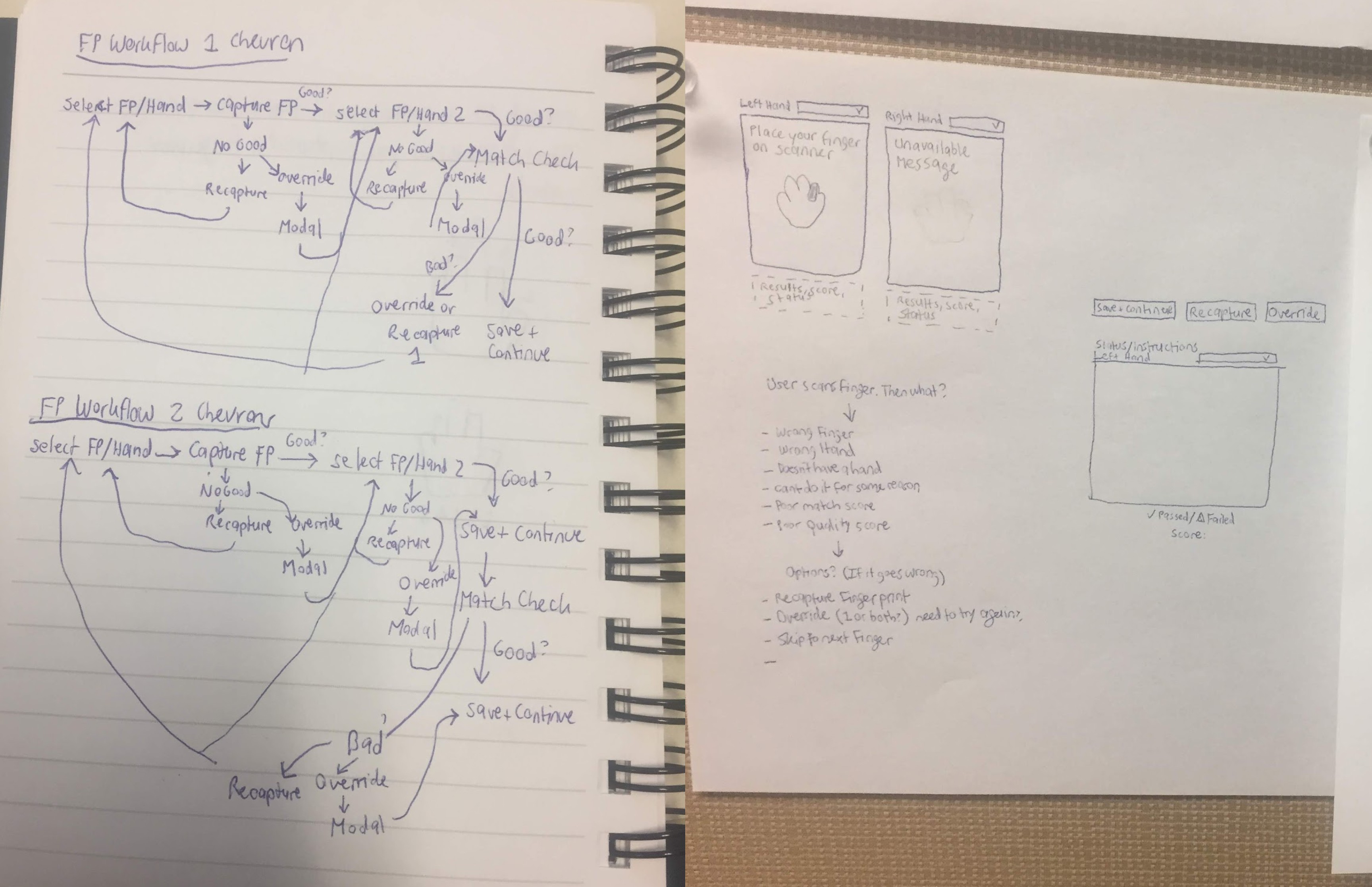
Early exploration of capture logic and edge cases

Translating early logic into interaction flows. We established an interactive hand graphic as the visual anchor for defining fingerprint combinations, giving CSRs a clear way to see and interact with the required fingers.

Simulating the fingerprint capture flow
Here's How We Built Web Enrollment's Fingerprint Capture Feature
1
We created a flexible, interchangeable set of workflows using configurable panels to accommodate different fingerprint capture and validation requirements.
2
We enabled states to define their own fingerprint combination requirements, including which combinations could be changed or locked.
3
We extended the experience beyond mouse interaction with keyboard shortcuts, enabling CSRs who couldn't use a mouse to complete the fingerprint capture workflow.
1
Flexible Workflows
1 and 2 Screen Flows

To accommodate varied state requirements, we designed both one-screen and two-screen fingerprint capture flows. Panels served as the building blocks that allowed us to adapt the experience across workflows.
Panels

Panels could be repurposed to hold fingerprint capture, Quality Score, or Match Score, with multiple panels working together within a single flow. This gave us a flexible skeleton for assembling different workflows, which we could then flesh out to progressively guide CSRs through each step.
1 Screen Flow: Quality and Match

1 Screen Flow: Quality and Match — capture and validate the applicant's fingerprints within a single screen, progressively moving through the required prints.
2 Screen Flow: Quality then Match

2 Screen Flow: Quality then Match — capture and validate Quality Scores first, then advance to a separate screen for Match assessment.
Results
We were able to offer states different user workflows based on their requirements and preferences.
Fingerprint captures were clearly validated as pass/fail based on Quality Score and Match Score results.
CSRs could efficiently capture and validate fingerprints within seconds.
2
Configurable Fingerprint Combos
Locked Combo

Some states required specific fingerprint combinations that couldn't be changed during capture.
Unlocked Combos

Other states gave CSRs the ability to change the required finger when an applicant's fingerprint couldn't be captured.
Overriding Locked Combos

If an applicant had a broken finger and couldn't provide the required fingerprint, the CSR could initiate an Override.
Results
Made it seamless for CSRs to capture fingerprints from a wide range of applicants.
Gave CSRs flexibility to accommodate applicants while respecting state requirements: locked combinations could be overridden when necessary, while unlocked combinations could be changed to better suit the applicant.
Made Web Enrollment a more attractive offering to prospective states.
3
Accessibility
Keyboard Accessibility

We mapped each action to the keyboard, making the entire workflow accessible to CSRs who couldn't use a mouse. Some users even preferred the keyboard shortcuts, finding them faster for getting through the flow.

This simulation shows how a CSR could reconfigure an unlocked fingerprint combination from the keyboard. The required fingers were already defined in the workflow; the CSR could select one and choose a replacement, creating alternative combinations for the applicant's capture. The capability could be enabled or disabled based on state requirements.
Results
Provided additional options for CSRs to move through the workflow.
Enabled CSRs who couldn't use a mouse to complete the fingerprint capture workflow from start to finish using the keyboard.